Opt In, Stay Out
How to ship AI capabilities so they’re available everywhere you want them — and invisible everywhere you don’t.
The architecture session ended with a working multi-agent context manager: four markdown files, a lock, a session skill, and a wrapper script for non-Claude CLIs. The thing worked. What it didn’t have was a way to get into a new project without copying files by hand.
That’s a different design problem, and it turned out to contain a non-obvious decision.
Step 1: The question that reframed distribution
The first instinct was to publish the context manager as a Claude Code plugin. Simple enough — plugins bundle skills, drop into ~/.claude/plugins/, and their skills become available globally. Done.
But Lou caught the flaw before it shipped:
“If I defined a plugin that included the session and context-mgr skills, couldn’t I just install the plugin in a local project and have the three skills local to the project, without polluting the global claude/codex/gemini context?”
That question contains the whole insight. Every globally installed skill adds tokens to every Claude session — whether you’re working in a project that uses it or not. Context isn’t free. A session skill that fires on check-in/check-out phrases is useless and mildly expensive in a project that has no .context/ directory. Globally installed, it’s always present. Project-local, it’s only present when you’ve opted in.
Concept #1: Context has a cost, and global scope means paying it everywhere. A globally installed skill loads for every session, every project. If the capability is project-specific — and multi-agent context management is inherently project-specific — the right scope is project-local. Capabilities the project doesn’t need should be invisible to it. This isn’t just tidiness; it’s precision. The fewer things loaded by default, the sharper the tools that are.
The switch from global plugin to project-local plugin isn’t a technical change so much as a scope decision. The plugin installs into .claude/plugins/ inside the project, not ~/.claude/plugins/. Skills declared in that plugin only activate in sessions running in that project. Other projects — other Claude sessions, Codex windows, Gemini sessions — never see them.
Step 2: One plugin, two skills
The previous session had shipped two separate plugins: context-mgr (project scaffolding) and session (the runtime skill that drives check-in and check-out). Separate repositories, separate installs, separate install story.
/plugin install loudalo/context-mgr    ← project files
/plugin install loudalo/session        ← the runtime skill
That’s two decisions where one was needed. The session skill is useless without the context manager, and the context manager is inert without the session skill. They always travel together. Shipping them as separate plugins asked the user to remember that relationship and act on it twice.
The right shape: one plugin, two skills.
context-mgr/
├── .claude-plugin/
│   └── plugin.json       ← declares both skills
└── skills/
    ├── context-mgr/      ← install skill: scaffolds .context/ into the project
    │   ├── SKILL.md
    │   ├── install.sh
    │   └── templates/
    └── session/          ← runtime skill: drives check-in, checkpoint, check-out
        └── SKILL.md
One install. Both skills arrive together. When the plugin is project-local, both skills only activate in that project.
Concept #2: Bundle what always travels together. Two things that are always used in combination are one thing. Splitting them into separate installs creates friction and the possibility of incomplete setups — the project where someone installed the scaffolding but forgot the runtime, or vice versa. When capabilities are genuinely coupled, the install story should reflect that.
Step 3: The thing that doesn’t belong
The initial bundle had three skills: ambient, context-mgr, and session. ambient is a broad skill router — it activates for general ambient-library work. The context manager has nothing to do with it.
It was included because it lives in the same codebase and seemed reasonable to ship together. That turned out to be wrong on both counts.
“The ambient skill is not part of the context manager.”
That correction surfaced a general principle: a plugin’s scope should match its single purpose. ambient serves a different job — it belongs in the ambient-library plugin, not in a plugin whose entire reason for existing is multi-agent project coordination. Bundling it here would have made ambient activate in every project that installed the context manager, for no reason.
The fix was three words. But the error pattern it exposes is common: adding adjacent things to a bundle because they’re easy to add, not because they belong there. Every extra skill in a plugin is more surface area, more potential for unexpected activation, more noise in the context of projects that installed the plugin for a specific purpose.
Concept #3: A plugin’s scope should match its purpose, not its neighborhood. “These files are in the same repo” is not a reason to bundle capabilities. Bundle by coupling — what will always be used together — not by proximity. A capability that sometimes overlaps with the plugin’s domain is not a candidate; it belongs in its own plugin, where it can be installed when it’s actually needed.
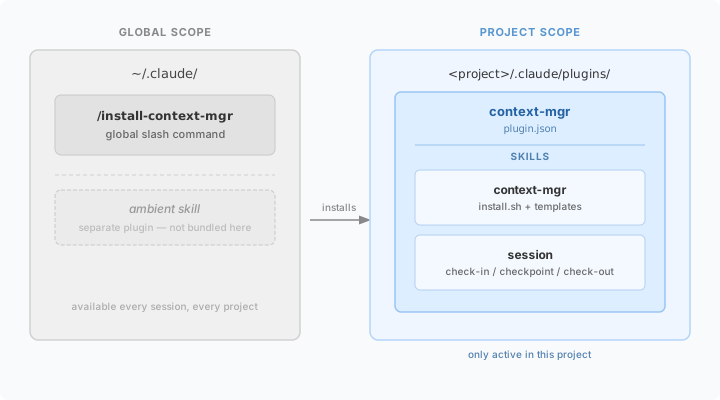
Step 4: The slash command is the right primitive
There was still the question of how the plugin gets installed into a new project in the first place. The plugin is project-local, but something has to put it there. The first instinct was a skill: “install context-mgr” as a trigger phrase, running the install script.
But a skill that installs another skill has a bootstrapping problem. You need the skill installed globally to trigger the install that puts the skill in the project. It also conflates two things: the install operation (a one-shot side effect) and the runtime capability (available every session).
The right primitive is a slash command:
~/.claude/commands/install-context-mgr.md
A global slash command lives at ~/.claude/commands/ and is available in every Claude Code session — no plugin required. It’s a one-shot operation: run it, it scaffolds the project, and from then on the project-local plugin handles everything. The command never fires again unless explicitly invoked.
/install-context-mgr              # scaffold current project
/install-context-mgr /path/to/project   # scaffold a specific path
/install-context-mgr --check      # dry run: see what would happen
The slash command calls install.sh, which drops the plugin, the .context/ templates, the hooks, the routing table, and the CLI bootstrap files into the target directory. After that point, the context manager’s capabilities are local to that project, and the slash command recedes into the background — available anywhere, necessary nowhere.
Concept #4: Use the right primitive for the job. One-shot operations belong in commands, not skills. A skill activates on natural-language triggers and runs in an ongoing session. A command is a user-invoked, one-shot action. “Install the context manager here” is a command: it fires once, produces a side effect, and exits. Expressing it as a skill conflates installation with capability, and creates a bootstrapping problem — you need the capability installed to install the capability. Slash commands exist precisely for one-shot global operations.
What the install story became
The design session arrived at a clean, two-step install:
# Step 1: one time, any machine (puts the command and plugin source in global scope)
cp -r /path/to/context-mgr ~/.claude/plugins/context-mgr
cp install-context-mgr.md ~/.claude/commands/

# Step 2: per project, whenever needed
/install-context-mgr
After step 2, the project has:
<project>/
├── .claude/
│   └── plugins/
│       └── context-mgr/    ← context-mgr + session skills, project-local
├── .context/               ← CHARTER, STATE, LOG, DECISIONS, archive
├── agents.yaml             ← routing table
├── AGENTS.md               ← Codex bootstrap
├── GEMINI.md               ← Gemini bootstrap
└── context-run.sh          ← wrapper for non-Claude CLIs
The skills fire only in this project. Nothing leaks into unrelated sessions. Other CLIs never see the Claude plugin structure at all — they get AGENTS.md and GEMINI.md, which install.sh drops directly and work the same regardless of where the Claude plugin lives.
Dormant by default. Active on demand. That’s the shape of a well-scoped capability.
The generalized principle
Strip away the plugin specifics and the pattern is about scope as a design decision, not an afterthought.
The default when shipping any capability is global: make it available everywhere so you never have to think about where it is. That default feels safe. It isn’t. Every globally installed capability is a standing cost — paid in context, in noise, in unexpected activations — across every project that never asked for it. “Available everywhere” silently becomes “present everywhere, whether you want it or not.”
The better frame: start by asking where does this capability actually belong? If the answer is “in projects that have opted in,” then global scope is the wrong shape from the start. Scope is the first decision, not the last.
The same questions that shaped the plugin work anywhere:
- Where does this actually need to be? Not “where could it be useful?” — where is it needed?
- What always travels with it? Bundle those. Split what doesn’t.
- Does everything in this bundle belong here? If not, it has its own home.
- What’s the one-shot operation vs. the ongoing capability? Separate them.
The capability that’s present only where it’s needed is the one that stays sharp.
This article is the companion to One Brain, Many Doors, which covers the architecture design session that preceded this one. That session answered “what should the context manager be?” — this one answers “how should it ship?”